Introduction and goals of the project
As a kid knowledge about the local area is important, but most kids don't enjoy studying books or maps for hours. We want to combine both knowledge and fun in one game, to make learning more enjoyable and motivated for kids.
The purpose of this assignment is to create an interactive game on a physical board with a map of Västerbotten. The game will provide information about the different areas, and once the game is turned on questions will be asked regarding various points on the map.
Besides playing the game there's also a mode for just reading and gaining information about various places.
Our full project specification can be found here: [Link]
Scenario
Kalle is a 10 year old boy who thinks it's hard to focus on the tasks in school because of his lack of interest. With an object to teach him in a more fun way, he would do much better in school. Forunately Kalle got this game in christmas present, and is about to try it.
Kalle wants to know more about Umeå, so he turns the rotation sensor
to "facts" and presses Umeå on the map. A display will show kalle some
interesting facts about the city. He can use a joystick to go back and
forth in the fact. Then he want to see more fact about Umeå so he
presses Umeå on the map again and a new fact turn up.
Later
Kalle wants to test his knowledge about Västerbotten. He turns the
rotation sensor to "singel play" and the display will show him a
question that he shall answer by pressing a city located on the map.
Kalle answer the first question correctly, so a lamp glows up and the
display shows the message "God! Correct answer is Umeå". Kalle continues
to the next question but this time his answer is incorrect, and the
display shows him the right answer.
Kalles friend Adam visit Kalle on the Christmas day. Kalle shows Adam his new game and they want to play against each other. They turn the rotation sensor to "multi play" and the game starts with "Player 1s turn do answer.". Kalle answer the first question correctly, so a lamp from the right glows up and the display shows the message "God! Correct answer is Umeå". Then the display show "Player 2s turn to answer.". Adam also answer correctly and a lamp from the right start to glow. The game is over when all the ten lamps have light up.
Now it's dinnertime so Kalle and Adam has to quit the game, so he simply turns the rotation sensor to "off" and the game shuts down.
Conceptual design
The idea of our game is to learn children more about geography, and
our prototype is focused on Västerbotten, Sweden. The user can decide
whether he/she wants to play singleplayer, multiplayer, read facts about
the different states or turn off the system. This is done through a
rotation sensor.
The purpose of this game is to motivate kids to learn geography and
general knowledge that they usually would find boring. We wanted to make
an entertaining game to make kids enjoy learning these things. By
combining the digital program with the physical feedback we think it's a
perfect way to help kids enjoy learning.
Physical design
The game consists of a board with a map of Västerbotten. It has a display for questions and feedback. There are also buttons made of touch sensors which the user can press to choose an answer. LEDs are used to show the user the current number of correct answers. The questions and some feedback will be shown on LCD text display. A ministick is also used to scroll down the display.
Different sound effects are used at correct answers, at wrong
answers, at a game over and if all the question have been asked but the
player doesnt have 10 correct answers.
A rotation sensor lets
the user choose between three different functions(states) such as facts
mode (learning more about Västerbotten, show information about points on
the map etc), single player mode and multi player mode. It is also used
to quit the game.
In single player mode the player competes with herself. To see the hole question the player can use a joystick. To win the game ten correct answers are required. When the player have ten correct answers all the lamps will blink. The less questions used to reach ten correct ones, the better result.
In multi player mode two friends can play against each other. They answer every other question and the lamps for correct ansers will light up from different sides. If both players have 5 correct answers all the lamps will blink. If one of the player had more correct answers than the other, the lamps to the winning player will blink.
In fact mode the player can press a city in the map and the display will show a fact from the city. If the player press the the city again a new fact will show.
(A RFID sensor is used to recognize the player, so different high scores are saved as different player names and so on. )
Implementation details
The phidgets we have used are:
- Touch sensors: one for each state
- LED lamps: for the correct answers
- Ministick: to scroll through text on the LCD text display
- Rotation sensor: to select different states (off, singleplayer, multiplayer and fact)
- LCD text display: to show the questions
- Speakers: to get soundrelated feedback
- Interfacekit phidget
We have also coded our program in Java (and ended with 1473 lines of code for the whole program..).
Pictures
Here are some pictures of the game while we did the programming.
Figure 1: A picture of the touch sensors (states in Västerbotten), the lamps (correct answers), the mini stick (joystick to go up and down in the text on the display), the rotation sensor (select game mode) and the interface kit.
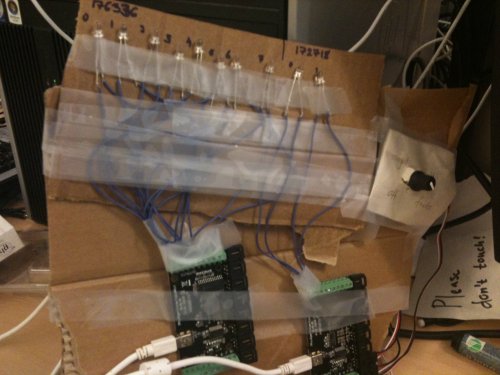
Figure 2: A picture of the lamps (correct answers), the rotation sensor (select game mode) and the interface kit.
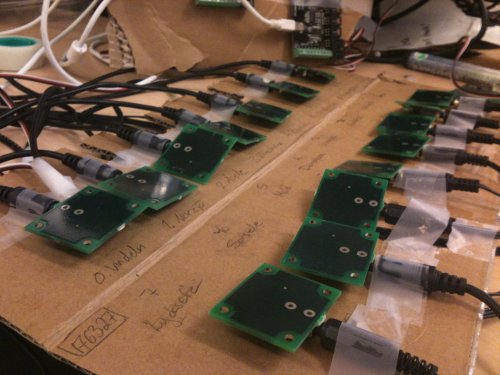
Figure 3: A picture of the touch sensors (states in Västerbotten).
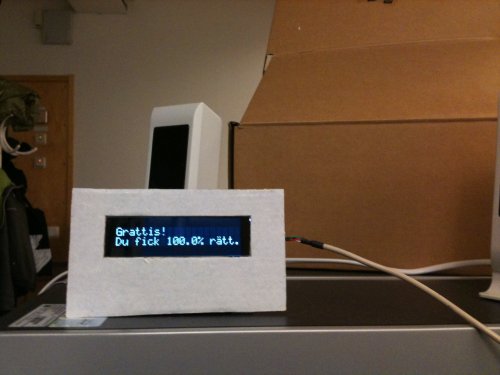
Figure 4: A picture of the LCD text display (questions, facts and feedback) and the speakers.
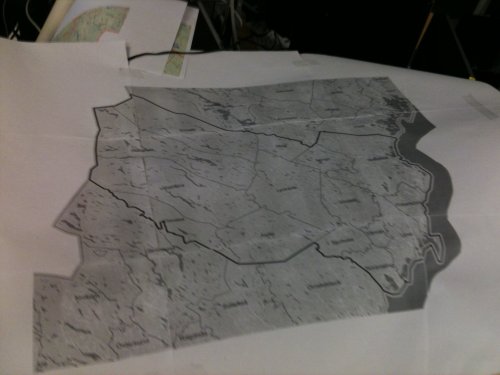
Figure 5: A picture of the map of Västerbotten.

Figure 6: A picture of the map, the touch sensors (under the map),
the lamps (two correct answers), the mini stick, the rotation sensor (game mode: single) and
the interface kit (under the map).

Figure 7: A picture of the mini stick, a joystick to go up and down
in the text on the display.
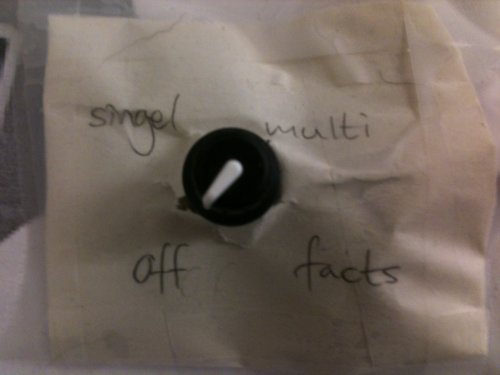
Figure 8: A picture of the rotation sensor were you can select game mode (off).
Literature survey
There are similar products on the markey today, but most of them are
computer based only and not very interactive with the children. Some
books we found related to our ideas were
http://site.ebrary.com/lib/UMEAUB/docDetail.action?docID=10080000
-
A Theory of Fun for Game Design, where Ralph explains the importance of
games, not only for kids. He mentions that all games have something to
do with learning even if some doesn't seem to. Accordning to Ralph
playing is about learning life skills. He means that games are models of
reality and therefore the games makes us reflect on reality.
Almost
every game is based on formal rule sets, which are mathematical
constructinos and therefore they always reflect forms of mathematical
truth. But Accordning to Ralph reflecting mathematical structures is
sadly the only thing many games do. But there are also some games to
teach us to examine the environment or space around us, so they can help
to improve one's memory.
http://www.adlibris.com/se/product.aspx?isbn=1557788634
- Digital Game-Based Learning
Discussion and conclusions
At the begining of the game we discussed the target group. We decided that the game should be in swedish because the target group is children in Västerbotten, Sweden, and we want the question to be easy for the children to read.
When the material for this game was limited we had to make some changes. At the beginning we wanted to have two touch sensors for answers e.g. "Yes" and "No", but because of the fifteen states there was no more touch sensors to use.
Another thing we thought of at the start of the project was to use
movable units to place at the right point on the map. Then a question
could be for example: Place Vildmannen were he belongs on the map. But
since the force sensors didn't seem to work, and since touch sensors
only respond to skin and some cables we skipped that idea.
Since we don't have any moving objects we thought that it could be a fun idea.
We also wanted to make another gameboard unit to use for multiplayer mode. The idea was to have a tag sensor which could syncronize the questions so that the two players could answer the same question and have their own lamps which would light up when they answer correctly. Instead we made a different multiplayer mode were the player answer the questions one by one on the same gameboard unit. Since we were out of touch sensors we didn't have the chance to make two different gameboard units.
Finding questions to the different states was difficult sometimes. In some states we found over fifteen fun facts and in others we barely found anything more than the year a city was founded, which probably isn't the most fun fact for a kid. If would had more time we would have found more fun facts.
One thing that could be improved is the physical feedback, e.g. in
factmode when the user pushes one state lamps will begin to shine at the
specific state.
The looks of the game could also be improved with
some colour. We never got our hands on a coloured map, and it makes the
entier gameboard look very colourless which some kids might find a bit
boring.
We never had time to paint the game either or improve the
looks in other ways. If we had time we could also have found some more
feedback sounds.
Conclusions about the game is that it has a
high potential in development. Multiplayer could be improved alot, like
synchronize two different gameboards. After a while all questions will
be known to most kids who have played for a while, but all you need to
increase the number of questions for the game is to add a few more to
some textfiles.
As a beginner and a kid the questions may be pretty difficult, but since the purpose is to motivate the kids to use the fact mode to improve in between the other modes. And we rather prefere the kids to struggle some to succeed than to know all the questions after one session.
Of course adults could play the game too. But a local adult who isn't new to the area most of the questions will be kind of easy. But for an adult who's new to the area and wants to learn some basic facts, or just to play the game with her kid the game works perfectly fine if they find it entertaining.
The expected impact is that alot of local kids will know the Västerbotten map better and improve their general knowledge. Schools could use the game to let the kids play on breaks, people could have it at home, they could bring it to their friends to play multiplayer.
Privacy issues is an important problem in alot of ubiquitous systems. By watching a user a system have the potential to leak actions, preferences, locations and other unknowns to us now, or in the future.
In our solution this is no big problem. All it does is gathering information about players score and high score in our game, and since it's not registered on a name it's not possible to know who got which score.
Earlier we planned to use and RFID sensor to register player names, but we skipped it because of privacy issues and lack of time, so our privacy issues here are barely any.
Another issue is the difficulty with personalized information. This problem occurs if a user is connected to several devices connected to a personal profile. Since there are no profiles in our game, this is no problem for our program.
Althrough the project we all thought that it was a very fun project!
